Search This Blog

Showing posts with label windows 7. Show all posts

03 September, 2013

command line configuration and statistics for Wi-Fi in windows OS

Netsh (Network shell)is a command-line scripting utility that allows you to, either locally or remotely, display or modify the network configuration of a computer that is currently running. 


1) To check the interface statistics


netsh wlan show interface


Output will be like below

Name : Wireless Network Connection

Description : Intel Centrino Advanced-N 6200 AGN

GUID : xxdcxxxx-xxxx-xxxx-axx5-xxxxxxxxxxxx

Physical address : xx:xx:xx:xx:xx:xx

State : connected

SSID : Belkin-test

BSSID : 0x:8x:3x:xx:xx:xx

Network type : Infrastructure

Radio type : 802.11g

Authentication : WPA-Personal

Cipher : TKIP

Connection mode : Profile

Channel : 3

Receive rate (Mbps) : 54

Transmit rate (Mbps) : 54

Signal : 90%

Profile : Belkin-test

26 March, 2013

how to list hidden folders in windows command line

For showing all the folders which are hidden we can use the dir command in the windows command line

 dir /a:dh /s d:\


 the above command will show all the hidden directories in the drive D:\, it will also show the sub directories. Change the last string to the specified drive or folder where you want to search

for writing these output to a file , use the below command

dir /a:dh /s d:\ > FilesName.txt

Hope this helps t

30 June, 2012

windows 7 opening command prompt to start with the folder selected

windows 7 opening command prompt to start with a folder we have selected


  1. Go to the folder you want the command prompt to start with
  2. press shift + right click the mouse 
  3. you can see an option "Open command window here" 
  4.  click on it and command prompt will open with the path you right clicked


10 June, 2012

windows 7 command for opening network connection properties directly

Getting to the page to bring up the screen that lists your network connections and their current status, you have to do lot of clicks. Below the shortcut for directly accessing it

For opening the network connections properties you can just type ncpa.cpl into the Start menu or WindowsKey+R and type ncpa.cpl


25 February, 2012

WiFi Soft AP - Virtual AP-Virtual Router - Windows 7 for internet sharing like wireless hotspot

hello all want to turn your laptop to a WiFi hotpsot. you can call it like Software AP, Soft AP, Virtual Access Point(VAP), virtual router. From Windows 7 onwards we can turn the WiFi adapter in the laptop or PC to work like an Access Point. So after turning on this feature your laptop/PC will act as an WiFi Access Point so that laptop/PC with wifi adapter can connect to it for browsing or you can do normal PC connectivity for data sharing

For this we need to configure the settings using netsh using administrator privilege and enable the internet connection for the interface which u want to share.

Follow the below steps to achieve it

1) Select the  network interface properties , say if you want to share the data card , select as shown below
2) Go to the Sharing tab and in the Internet Connection Sharing

check the checkbox Allow other network users to connect through this computers Internet connection as shown in the below figure

3) Now open the command prompt in administrator privilege, For this you can right click on the command prompt in the start menu right click on it and press Run as administrator


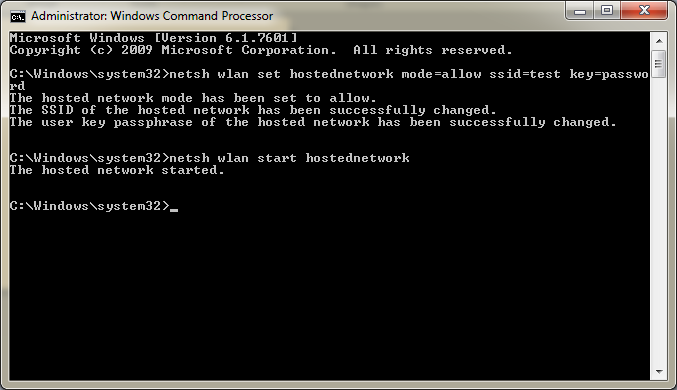
4) Now in the command prompt type the below two commands
netsh wlan set hostednetwork mode=allow ssid=test key=password
netsh wlan start hostednetwork


You can see the output for the commands typed

After this, you laptop/PC is ready as an WiFi Access Point (AP), and others can connect to it for internet browsing or transferring data between the computers


20 June, 2011

enabling TFTP client in windows 7

windows 7 enable tftp client
you can enable TFTP client in windows 7 by following the below steps

    Start
    Control Panel
    Programs And Features
    Turn Windows features on or off
    Check TFTP Client
    Hit OK

After that you can start tftp via Command Prompt.


enabling telnet in windows 7

windows 7 enable telnet:
you can enable telnet in windows 7 by following the below steps

    Start
    Control Panel
    Programs And Features
    Turn Windows features on or off
    Check Telnet Client
    Hit OK

After that you can start Telnet via Command Prompt.

tmux enabling mouse interaction

Add the below line to the ~/.tmux.conf setw -g mouse on save the file and exit from the tmux shell, you should be able to use your mouse to ...